Advanced Segment Reporting


The Segment Report offers an easy way to get lists of the accounts defined within 6sense Segments.
Key Features
- Downloads of accounts per Segment
- Download function has a filter to report only on accounts in CRM
- Download of accounts in CRM gives the 6sense ID, CRM Account ID and the CRM Account Name
Use Case Summary
- Download the list of accounts within a Segment
- Manage duplicates within the download account list
Download the list of accounts within a Segment
To get the list of accounts in a spreadsheet, do the following:
- Select Segments in the left-hand nav and then select the target Segment.
- Select the Download button in the upper right-hand corner of the report.
- Prior to downloading, the system will ask if you want to see all accounts (6sense plus CRM) or only the accounts in CRM.
Manage duplicates in the downloaded account list
If you download accounts that are in CRM, be aware that the file may show what might appear to be duplicate entries. This is a result of the account having multiple CRM Account IDs mapped to a single 6sense ID.
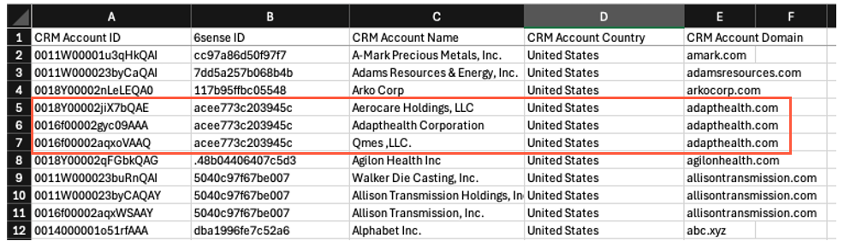
In the image above, you will see the same 6sense ID on lines 5, 6 and 7. The account is separated into 3 unique CRM IDs shown in column A that map to a single 6sense ID in column B.
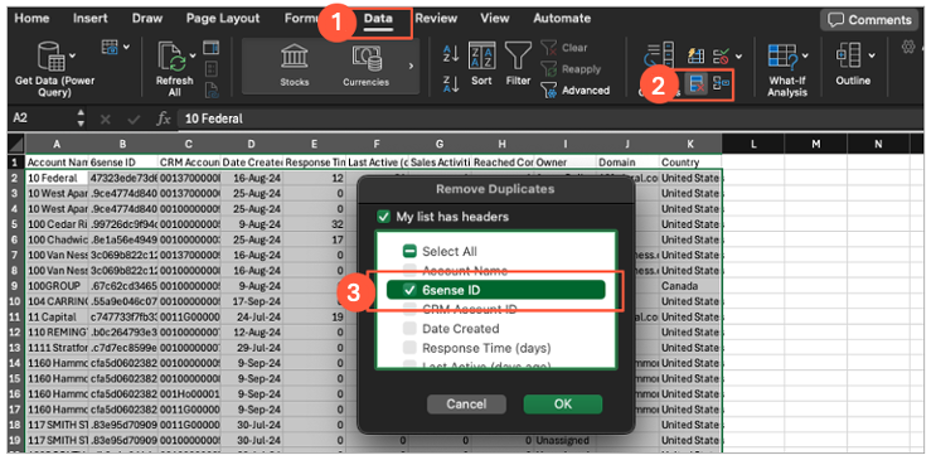
In cases where you would like to know how many unique accounts are in the segment without CRM duplication, you can take the steps below in Excel.
- Select Data from the menu at the top of Excel
- Select the Remove Duplicates icon
- Unselect all accounts and then select 6sense ID
This will remove rows with duplicated 6sense IDs.
Comments
-
@Dave DiMillo This is incredibly helpful for those of us looking to solve mismatch issues between 6sense and our CRM.
2 -
@Dave DiMillo Is there a good way to search by the 6sense ID?
I've pulled a broad list of accounts and noticed that many don't have a website field. It doesn't seem like I can search the 6sense ID to identify the account the agency is being associated with.
0 -
You can send me your spreadsheet at dave.dimillo@6sense.com and I can look at that for you.
1 -
Will do, @Dave DiMillo. I'm going to need some time to pare it down. I'm using this method to identify issues in our Salesforce that we can fix and I'm examining the entirety of our accounts.
0

Upcoming Events
-
6sense for 6sense: The Inside Story | UK/EMEA Session
Tune in for an exclusive webinar, The Inside Story, an hour on how our own teams really run go-to-market. You’ll see the processes they use, how they put them into practice, and where 6sense, connected tools and AI fit in. Happening on: EMEA: Thursday, Dec. 10, 2 pm GMT / 3 pm CET What you'll leave with: A clearer view of…
-
6sense for 6sense: The Inside Story | NORAM Session
Tune in for an exclusive webinar, The Inside Story, an hour on how our own teams really run go-to-market. You’ll see the processes they use, how they put them into practice, and where 6sense, connected tools and AI fit in. Happening on: NORAM: Tuesday, Dec. 15, 11 am PT / 2 pm ET What you'll leave with: A clearer view of…
Categories
- All Categories
- 1 RevvyAI
- 22 Maturity Model
- 6 Groundwork Use Case Playbooks
- 7 Transform Use Case Playbooks
- 6 Maximize Use Case Playbooks
- 1 Crossword
- 762 All Discussions
- 67 Product Updates
- 61 6th Street
- 12 Welcome
- 7 Academy News
- Academy Course Reflections
- Agentic GTM Certification
- 2 Next-Gen Sales Certification
- 4 Administrator Certification
- 4 Advertising Certification
- 11 Demand Gen Plays
- 23 Reporting HQ
- Business Value Assessment (BVA)
- 46 AI Email
- 2 What is AI Email?
- 8 AI Email Use Cases
- 16 Thriving with AI Email
- 6 Conversation Starters
- 237 Job Board
- 34 General
- 11 Partner Place
- 252 Research Road
- Compensation Calculator
- 79 Sales
- 14 Pipeline Generation Tuesdays
- 19 BDR Block
- 11 SKO Supplies
- 7 Advice
- 2 Assets
- 19 Verticals
- 10 Manufacturing, Logistics & Supply Chain
- 7 Financial Services
- search-results
- 345 Events
- 54 Inspire UK
- 8 Inspire 26
- 11 Inspire 24
- 253 Breakthrough
- 47 Breakthrough 26
- 52 Breakthrough 25
- 12 6sense Quarterly Product Update (Recordings)
- 26 Customer Story Hour (Recordings)